OVERALL RATINGS
INSTALLS
1
SUPPORT
- Partner Supported
TRUST SIGNALS
Key highlights of the appDownload every attachment on an issue, a JQL or a whole project as one zip, then find the duplicates
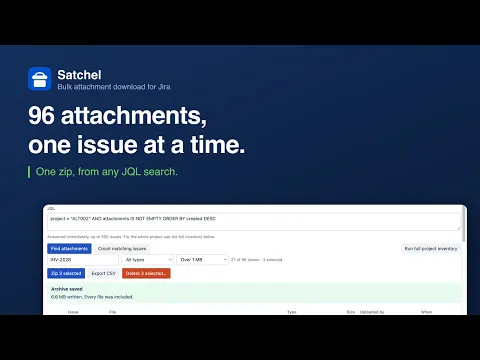
One zip for a whole search
Jira's own Download all stops at one issue. Satchel zips a JQL result or an entire project in one archive, foldered by issue key, after filtering by name, type or size.
See what is eating your storage
Duplicate groups with reclaimable bytes, occupancy by uploader, file type and age, the biggest files, and a CSV inventory. Jira shows one site-wide number and nothing underneath it.
Nothing leaves Atlassian
The zip is built in your browser from your own session. No external server, no egress permission in the manifest, no copy of your files anywhere.
Supporting media
More details
The problem
Jira Cloud can zip one issue's attachments. It cannot zip a search or a project: collecting the files behind a quarter's close means opening every issue and downloading each one separately. Open since 2018: JRACLOUD-68871, 113 votes.
What Satchel does
Zip anything. One issue from its panel; a JQL result or a whole project from the project page, foldered by issue key. Any single file also downloads without the preview step.
Then govern it. Duplicate groups with the bytes each would reclaim. Storage by uploader, file type and age. The biggest files. A CSV inventory.
Delete carefully. A dry run, a typed confirmation, an audit record per file. Deletion ships switched off and is administrator-only.
Nothing leaves Atlassian. The archive is built in your browser from your own Jira session. No external server, no egress permission.
Duplicates match on filename and exact byte size; Jira exposes no content hash, and Satchel says so wherever it shows a number.
Resources
App documentation
Comprehensive set of documentation from the partner on how this app works
Privacy and Security
Privacy and security questionnaire has been filled by the partner
Privacy policy
Atlassian's privacy policy is not applicable to the use of this app. Please refer to the privacy policy provided by this app's partner.
Partner privacy policySecurity program
This app is not part of the Marketplace Bug Bounty program.
Integration permissions
Satchel — Bulk Attachment Download & Manager integrates with your Atlassian app
Version information
Version 2.2.0•for Jira Cloud
- Release date
- Sep 24th 2026
- Summary
- Minor version update
- Details
Minor version update
- Payment model
- Paid via Atlassian
- License type
- Commercial