OVERALL RATINGS
INSTALLS
4
SUPPORT
- Partner Supported
Key highlights of the appBuild, explore and manage Assets schemas in Jira Service Management
Install a working Assets structure
Pick a template, see exactly what it creates, and install it in minutes. Object types, attributes, references and parent and child types are built in your own Assets.
See how your structure connects
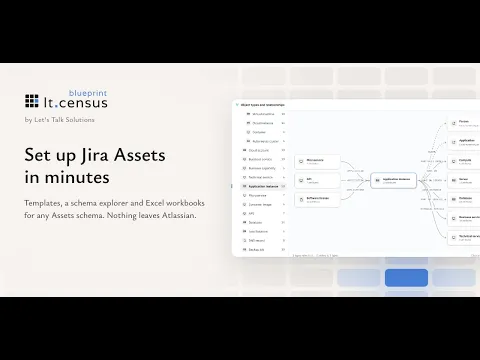
Enterprise IT CMDB in the Schema explorer: the object type tree, and Application instance with the types it links to and the types that link to it.
Load and update objects in bulk
Download an Excel workbook for any Assets schema, with dropdowns, lookups and real example rows. Import it to create objects, or update existing ones by their key.
Supporting media
More details
Start from a template such as Core, Standard or Enterprise CMDB, Cybersecurity or Service catalogue. The Schema explorer shows every object type, attribute and reference before you install, and the structure is built in your own Assets.
Then fill it. The Excel workbook works with any Assets schema, ours or yours, with dropdowns, lookups and example rows that are skipped on import. Rows with an Object Key update the existing object.
Request field analysis finds request fields that should be Assets pickers and gives you the steps to finish them in Jira.
What it doesn’t do:
- It doesn’t score or grade your setup.
- It doesn’t send your data anywhere. No outside servers, no API tokens, no accounts.
Made by Let’s Talk Solutions, a UK Atlassian consultancy with more than 15 years in Jira Service Management and Assets.
Resources
App documentation
Comprehensive set of documentation from the partner on how this app works
Privacy and Security
Privacy and security questionnaire has been filled by the partner
Privacy policy
Atlassian's privacy policy is not applicable to the use of this app. Please refer to the privacy policy provided by this app's partner.
Partner privacy policySecurity program
This app is not part of the Marketplace Bug Bounty program.
Integration permissions
lt.census blueprint integrates with your Atlassian app
Version information
Version 2.14.0•for Jira Cloud
- Release date
- Nov 1st 2026
- Summary
- Minor version update
- Details
LaunchPad is now lt.census blueprint, part of the lt.census family. Same features, a new look and a few new things.
New
- New name, new look and a cleaner layout.
- Opens straight away, with a short loading animation on a slow start.
- Assets page: browse objects by schema and type, and open any object in Jira Assets from its key.
- Excel workbooks include three example rows per sheet, skipped on import, and work with any Assets schema.
- Schema explorer: a tree of object types, a graph focused on one type, and every template in the schema list.
Improved
- Request field analysis gives three steps to finish an Assets field and marks finished fields as done.
- Explorer checks count inherited attributes, and every finding opens.
- Workbook rows that only change references now update the object.
- Settings shows the app version and a working Activity log.
- Actions that change Assets now need a Jira administrator.
No new permissions.
- Payment model
- Paid via Atlassian
- License type
- Commercial - no charge