Free app
OVERALL RATINGS
SUPPORT
- Partner Supported
TRUST SIGNALS
Key highlights of the appFormatted notes, checklists, links and announcements on any Jira dashboard, in Jira's own font and light or dark theme
Notes that fit your dashboard
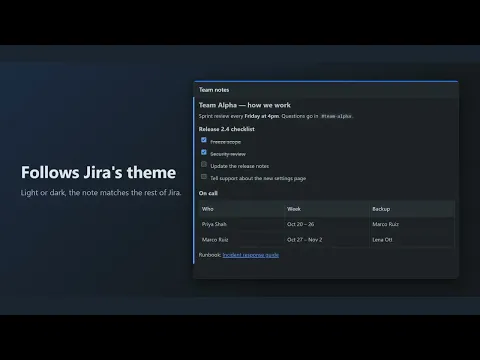
Headings, checklists, tables, links and images in Jira’s own font, so team context sits right next to your charts and filters.
Matches light and dark themes
The gadget follows each person’s Jira theme automatically, including checkboxes, tables and links. No settings needed.
Edit fast, undo safely
Use the toolbar or markdown shortcuts, paste or drag in images, and restore any of the last five saved versions in one click.
More details
Dashboard Notes gives every Jira dashboard a proper place for team context: how you work, who is on call, links to runbooks, release checklists and announcements.
Built to fix what people dislike about older notes gadgets: it uses Jira’s own font, follows the light and dark theme, keeps images inside the app instead of needing public image links, opens links in a new tab, and keeps the last five versions so a bad edit is one click from undone.
Free, with no limits on the number of gadgets. Runs on Atlassian: notes never leave your Jira site, and the app stores no personal data.
Resources
App documentation
Comprehensive set of documentation from the partner on how this app works
Privacy and Security
Privacy and security questionnaire has been filled by the partner
Privacy policy
Atlassian's privacy policy is not applicable to the use of this app. Please refer to the privacy policy provided by this app's partner.
Partner privacy policySecurity program
This app is not part of the Marketplace Bug Bounty program.
Integration permissions
Dashboard Notes Gadget: Rich Text & Checklists for Jira integrates with your Atlassian app
Version information
Version 2.1.0•for Jira Cloud
- Release date
- Oct 19th 2026
- Summary
- First release: rich notes, checklists, tables and images for dashboards
- Details
First public release of Dashboard Notes. Headings, bold, italic, underline, code, bullet and numbered lists, checklists, quotes, tables, links, dividers and images (upload, paste or drag; resized automatically). Markdown shortcuts. Accent colour and compact spacing options. The last five saved versions with one-click restore. Follows Jira’s light and dark themes. Runs on Atlassian and stores no personal data.
- Payment model
- Free
- License type
- Commercial - no charge