Crisp Diagrams: Mermaid, PlantUML, Excalidraw for Confluence
Free app
OVERALL RATINGS
INSTALLS
3
SUPPORT
- Partner Supported
TRUST SIGNALS
Key highlights of the appSharp, zoomable Mermaid, PlantUML, D2, DBML and Excalidraw diagrams with live preview, dark mode and PDF export. Free
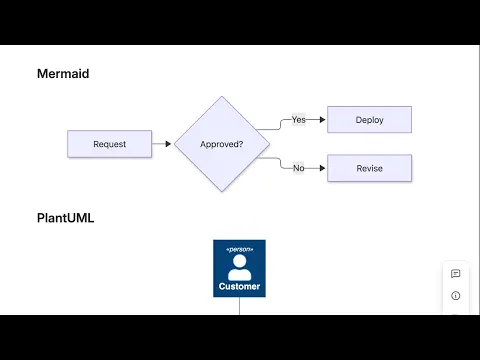
Crisp SVG that fits the page
Mermaid, PlantUML, D2, DBML and Excalidraw render as vector SVG at page width, not a blurry fixed image. Click any diagram for full screen with scroll-to-zoom and drag-to-pan, built for big architecture and ER diagrams.
Five languages, live preview, paste anything
Split editor with live preview, resizable layout, starter templates and errors that name the line. Switch language inside any macro. Paste a fenced block from an AI chat, or a mermaid.live or plantuml.com link.
Full screen, dark mode, PDF exports that work
Scroll to zoom and drag to pan any diagram full screen. Diagrams follow Confluence light and dark themes. Save once and PDF and Word exports include the rendered image, never a code block or an error box.
More details
Quick start: in the Confluence editor type / and choose Mermaid Diagram, PlantUML Diagram, D2 Diagram, DBML Diagram or Excalidraw Drawing. Pick a starter template or paste your code, watch the live preview, and Save. Click any diagram on the page for full screen with zoom and pan; hover it for SVG and PNG downloads. Paste a fenced code block from an AI chat or README, or a mermaid.live, plantuml.com or Kroki link, and it imports with the right language. Engines shipped inside the app and rendered in your browser: Mermaid 12, PlantUML 1.2026 (C4, Kubernetes, Azure, GCP, Elastic and ArchiMate libraries included), D2, DBML and Excalidraw 0.18. Diagrams follow Confluence light and dark themes, and saved diagrams appear as images in PDF and Word exports. No render server, no account, no diagram limit and no external requests: eligible for the Runs on Atlassian marker. Documentation and support: support@llmgraph.ai. Built by Katabarwa Labs.
Resources
App documentation
Comprehensive set of documentation from the partner on how this app works
Privacy and Security
Privacy policy
Atlassian's privacy policy is not applicable to the use of this app. Please refer to the privacy policy provided by this app's partner.
Partner privacy policySecurity program
This app is not part of the Marketplace Bug Bounty program.
Integration permissions
Crisp Diagrams: Mermaid, PlantUML, Excalidraw for Confluence integrates with your Atlassian app
Version information
Version 2.1.0•for Confluence Cloud
- Release date
- Sep 14th 2026
- Summary
- First release: Mermaid, PlantUML, D2, DBML and Excalidraw macros for Confluence
- Details
Five diagram macros for Confluence Cloud: Mermaid 12, PlantUML 1.2026 (rendered in the browser, C4, Kubernetes, Azure, GCP, Elastic and ArchiMate libraries included), D2, DBML to entity relationship diagram, and Excalidraw drawings. Vector SVG that fits the page, full-screen pan and zoom, SVG and PNG download, live preview editor with templates and line-numbered errors, language switch inside any macro, paste of fenced code blocks and mermaid.live, plantuml.com and Kroki links, Confluence light and dark themes, and rendered images in PDF and Word exports. Runs entirely on Atlassian: no external servers, no account, no limits. Free.
- Payment model
- Free
- License type
- Commercial - no charge