INSTALLS
No installs yet
SUPPORT
- Partner Supported
TRUST SIGNALS
Key highlights of the appLock Jira fields after approval or when closed: edits from any route are put back within seconds and logged for audit
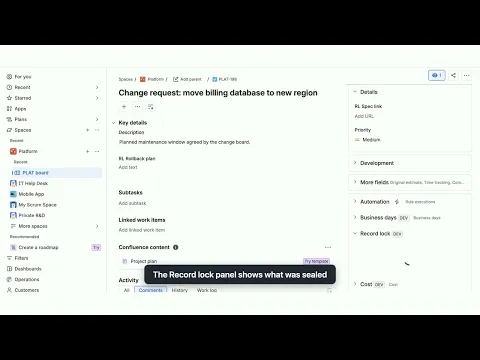
Lock fields after approval or when closed
Pick projects, work types and fields, then lock them when work enters a status, is resolved or is created. Exempt a group or project role. Start with Audit only and switch to Enforce when ready.
Bulk edit, automation and API edits put back
Issue view, bulk edit, automation, imports or API: changes to locked fields go back to the approved value within seconds, without notifications, and stop with a logged warning if something keeps changing them.
An as-approved record you can verify
Each lock stores the approved values with a SHA-256 hash. Verify any work item, unlock with a logged reason, and export the audit trail and snapshots as CSV for any date range.
More details
Jira can make a work item read only in a status, but only in company-managed projects, and admins and apps can override it. Screen behaviours only change the form; bulk edit, automation and REST changes get through.
Record Lock watches the fields you choose. When a work item is approved, closed or created, it stores the approved values. Later changes to those fields are checked, whoever made them: Audit only logs them, Enforce puts them back about 2 seconds later and logs them. The field is not read only on screen. The app needs permission to browse the project. If a check fails, the change stays. Exempt groups and roles can still change them; that becomes the new approved value.
Use it to keep approved changes, signed-off requirements, agreed due dates and closed tickets as approved, with an audit trail of field changes. Find locked work with recordLocked = yes in JQL.
Built on Atlassian Forge. Record Lock runs on Atlassian's infrastructure and makes no calls outside Atlassian.
Resources
App documentation
Comprehensive set of documentation from the partner on how this app works
Privacy and Security
Privacy and security questionnaire has been filled by the partner
Privacy policy
Atlassian's privacy policy is not applicable to the use of this app. Please refer to the privacy policy provided by this app's partner.
Partner privacy policySecurity program
This app is not part of the Marketplace Bug Bounty program.
Integration permissions
Lock Fields After Approval for Jira integrates with your Atlassian app
Version information
Version 2.0.0•for Jira Cloud
- Release date
- Oct 30th 2026
- Summary
- First release: lock rules, put-backs, audit log, sealed snapshots, CSV export.
- Details
First release. Lock rules by project, work type, status, resolution or creation (with a grace period); chosen fields or all supported fields; exempt groups and project roles; Audit only and Enforce modes; Jira Automation edits allowed or not. Sealed snapshots with SHA-256 hashes and Verify, unlock with a reason, a Record lock panel on work items, an audit log with filters, CSV export of audit entries and snapshots, Test a work item, Lock existing work items, and JQL search with recordLocked.
- Payment model
- Paid via Atlassian
- License type
- Commercial