OVERALL RATINGS
INSTALLS
2
SUPPORT
- Partner Supported
TRUST SIGNALS
Key highlights of the appFor Jira Standard admins: see which configuration limit will block you next and when, then clean up safely with evidence
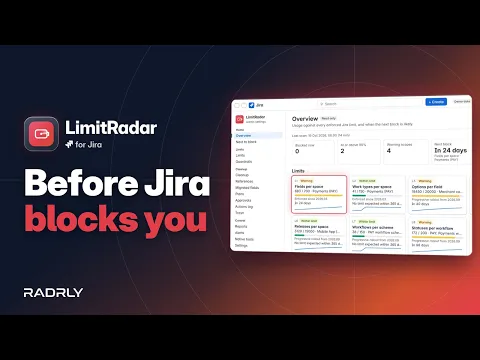
See which Jira limit will block you next
LimitRadar tracks usage against every enforced Jira limit, such as fields per space, options per field and statuses per workflow, and forecasts when each scope will block.
Clean up safely with simulation and undo
Cleanup lists unused fields and other candidates with the evidence for each. Simulate a plan to see the new usage, run it with a typed confirmation, and restore trashed fields for 60 days.
Threshold alerts before a Jira limit blocks
Advanced edition: LimitRadar raises an alert when a scope crosses 80%, reaches your alert rule or is blocked, so admins can act before work stops. Acknowledge each alert once handled.
Editions New
This app offers two different editions - Standard and Advanced. You can start a free trial of either edition, and change your edition anytime during or after the trial.
Standard
Onboard your team and scale fast
Includes:
Limit usage and guardrails
Forecasts and Next to block
Safe cleanup with undo
Weekly digest
Reports, export and gadget
Advanced
Unlock the full range of app features
Everything from Standard, plus:
Rovo agent with 32 actions
Threshold alerts
Custom alert thresholds
Configurable history retention
Signed PDF report with Verify
More details
LimitRadar measures Jira Cloud configuration limits for site admins, built first for the Standard plan (no Site Optimizer) and working on Premium and Enterprise too.
Insight: usage against all 10 enforced limits and four guardrails, a headroom score, forecasts with no invented dates, a ranked Next to block list and a check for bulk adds.
Cleanup: candidates with evidence (references in filters, boards, dashboards, workflows and screens), a simulator and plans. Writes are off at install; a plan needs a stored simulation, the typed plan name and a fresh backup.
Quick start:
- Install from Marketplace and approve the scopes.
- The first scan starts on its own.
- Open Jira settings > Apps > LimitRadar.
- Check Overview and Next to block.
- Open Cleanup, add candidates, simulate and save a plan.
Also: Rovo agent with 32 actions, UI in EN, DE, FR, PL, Runs on Atlassian. Full guide: https://limitradar.radrly.com/docs/
Resources
App documentation
Comprehensive set of documentation from the partner on how this app works
Privacy and Security
Privacy and security questionnaire has been filled by the partner
Privacy policy
Atlassian's privacy policy is not applicable to the use of this app. Please refer to the privacy policy provided by this app's partner.
Partner privacy policySecurity program
This app is not part of the Marketplace Bug Bounty program.
Integration permissions
LimitRadar: Limits Forecast & Safe Cleanup for Jira integrates with your Atlassian app
Version information
Version 2.35.0•for Jira Cloud
- Release date
- Nov 6th 2026
- Summary
- Minor version update
- Details
- Minor version update
- Payment model
- Paid via Atlassian
- License type
- Commercial