OVERALL RATINGS
INSTALLS
4
SUPPORT
- Partner Supported
Key highlights of the appView, link, manage and update all your Snipe-IT assets directly from your Jira tickets
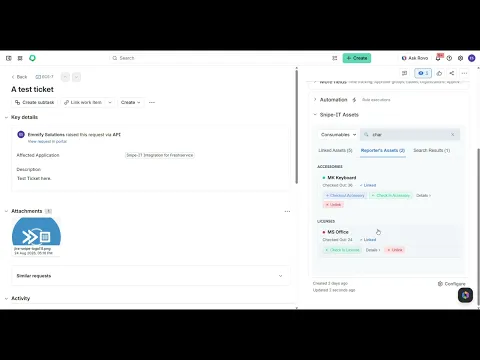
Search and Link Assets
Search for an asset and link it to the current ticket. You can select which asset type you are looking for from the drop down. You can search and link Hardware, Accessories, Consumables and Licenses from Snipe-IT
View Linked Assets
View all assets linked to the current ticket. The asset cards contains a number of quick actions like Check-in, Check out, Modify and Details.
Granular Feature Controls
You can allow/disallow almost all features the app offers. Features like Check-in, Checkout, Reporter’s Assets tab, adding maintenance records, History logs tab, and many more can be allowed and disallowed as preferred.
Supporting media
More details
Snipe-IT Integration for Jira allows you to manage and link Snipe-IT assets directly within Jira tickets. It comes with the following features:
- View Assets →See details for any hardware, license, accessory, or consumable within a Jira ticket.
- Checkout & Check-in → Assign Snipe-IT assets to users, locations, or other assets within Jira. Check them back in just as easy.
- Auto-find User Assets → Automatically pulls all devices assigned to the person who created the ticket and displays them.
- Edit Details →Update an asset's status, location, allowed custom fields or notes.
- History & Maintenance →See the full history logs of an asset and log new maintenance records.
- Customer Portal →Lets your users select from their assigned devices when raising a ticket and link them.
- Secure & Native → Built on Forge; your data never leaves Atlassian servers.
- Language → The app is currently available only in English.
For questions, feature requests, or troubleshooting, contact us at: developer@emmify.cloud.
Resources
App documentation
Comprehensive set of documentation from the partner on how this app works
Privacy and Security
Privacy policy
Atlassian's privacy policy is not applicable to the use of this app. Please refer to the privacy policy provided by this app's partner.
Partner privacy policySecurity program
This app is not part of the Marketplace Bug Bounty program.
Integration permissions
Snipe-IT Integration for Jira integrates with your Atlassian app
Version information
Version 5.1.0•for Jira Cloud
- Release date
- Aug 4th 2026
- Summary
- View, link, and update all your Snipe-IT assets directly from your Jira tickets
- Details
- Live Issue Context Panel: View, search, and link Snipe-IT hardware assets directly from any Jira ticket.
- Asset Actions: Check assets in, check them out, or update their status without ever leaving Jira.
- Reporter Asset Lookup: View a list of all hardware assigned to the Jira ticket's reporter for rapid troubleshooting.
- Dashboard : Monitor your asset numbers and distribution from your Jira Dashboards.
- Granular Security Controls: Jira administrators can restrict asset action permissions (e.g., checkout/check-in) to specific Jira user groups.
- Payment model
- Paid via Atlassian
- License type
- Commercial