INSTALLS
No installs yet
SUPPORT
- Partner Supported
TRUST SIGNALS
Key highlights of the appAttachment custom fields for Jira: named file fields like Signed contract, with required files and file type and size limits
Stop hunting for the right attachment
Add fields like Signed contract or Site photos. Users tick files already attached to the issue, with thumbnails, and see each slot’s files as file cards on the issue.
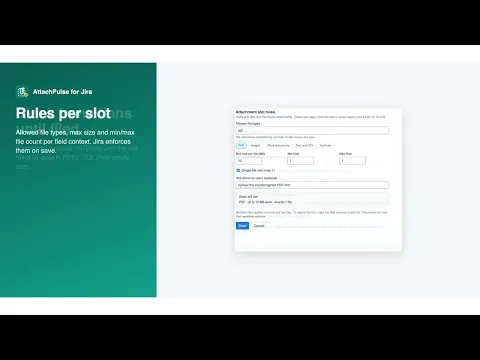
Reject wrong file types and oversized files
Allowed file types, max size per file and min/max number of files per field context. Files that break a rule are greyed out, and Jira enforces the rules on save.
Block Done until the contract is attached
A workflow validator stops Approve or Done until a slot holds at least N files of the right type. Find empty slots with JQL such as “Contract” is EMPTY.
Supporting media
More details
AttachPulse adds an Attachment slot custom field type to Jira. Create named slots such as Signed contract, Invoice PDF or Site photos and add them to any screen. Users attach files the normal way, then open the slot and tick the files that belong in it. Images show thumbnails, and files that break the rules are greyed out with the reason. Each slot has its own rules: allowed file types, maximum size per file, minimum and maximum number of files, and a hint for users. Jira checks the rules every time the field is saved. The Attachment slot has files workflow validator blocks a transition until a slot holds at least N files of the types you choose, for example no Approve without a signed PDF. Slots work in JQL: “Signed contract” is EMPTY, “Site photos.Count” >= 3, “Invoice PDF.FileType” = pdf. AttachPulse runs on Atlassian. It has no storage of its own and stores no personal data.
Resources
App documentation
Comprehensive set of documentation from the partner on how this app works
Privacy and Security
Privacy and security questionnaire has been filled by the partner
Privacy policy
Atlassian's privacy policy is not applicable to the use of this app. Please refer to the privacy policy provided by this app's partner.
Partner privacy policySecurity program
This app is not part of the Marketplace Bug Bounty program.
Integration permissions
Attachment Custom Fields & File Rules for Jira integrates with your Atlassian app
Version information
Version 2.2.0•for Jira Cloud
- Release date
- Nov 9th 2026
- Summary
- Fixes the oversized icon in the workflow validator summary
- Details
Fixed the paperclip icon in the workflow validator summary, which showed at full size instead of a small icon.
- Payment model
- Paid via Atlassian
- License type
- Commercial