INSTALLS
No installs yet
SUPPORT
- Partner Supported
TRUST SIGNALS
Key highlights of the appShow customers chosen fields, the assignee, SLA targets and linked requests on their request in the customer portal. Read-only
Fields your customers ask about
Pick up to 20 fields, including ones agents fill in that are not on the request form, and give each a label customers understand. Each request type can use the default set, its own set, or none.
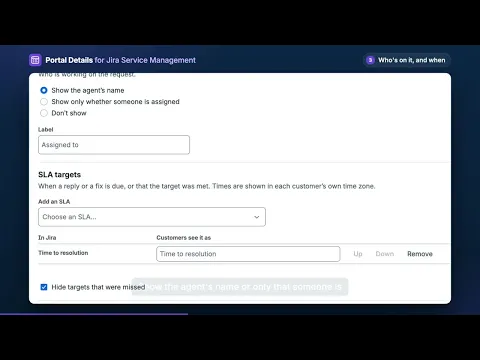
Who is on it, and when to expect an answer
Show the agent’s name, or only that someone is assigned. Show when a reply or a fix is due, in the customer’s own time zone, and that the target was met. Missed targets stay hidden unless you choose to show them.
Linked requests, safely
Customers see a linked request only if they can open it on the portal. Internal work is never named. You can count it by status (“Is blocked by 1 other item: 1 in progress”) so customers know something is moving.
More details
Customers ask “who is working on this?” and “when will I hear back?” because the portal does not show it. Portal Details adds a panel beside each request in the portal with the details you choose. Set it up per service project, and preview the panel as the person who raised a request sees it before you save. Jira admins can set up any service project; project admins can set up their own.
Each customer sees the panel only on requests they can open: ones they raised, were added to, or that are shared with their organization. The app is read-only: it has no write scope, so it cannot change a request. Nothing about requests or customers is stored; the panel reads the request each time it is shown. It runs on Atlassian and sends no data outside.
Not offered: Assets fields (Jira’s API gives object IDs, not names), approvals, satisfaction ratings, and about 25 system fields such as attachments, comments and work logs. The portal already shows approvals, attachments and comments.
Resources
App documentation
Comprehensive set of documentation from the partner on how this app works
Privacy and Security
Privacy and security questionnaire has been filled by the partner
Privacy policy
Atlassian's privacy policy is not applicable to the use of this app. Please refer to the privacy policy provided by this app's partner.
Partner privacy policySecurity program
This app is not part of the Marketplace Bug Bounty program.
Integration permissions
Portal Details: Show Fields, Assignee and SLAs to Customers integrates with your Atlassian app
Version information
Version 3.0.0•for Jira Cloud
- Release date
- Nov 17th 2026
- Summary
- First release: show customers chosen fields, assignee and SLAs on the portal
- Details
Adds a Details panel to requests in the customer portal. Admins choose per service project which fields, the assignee and which SLA targets customers see, and whether linked requests are shown. Read-only.
- Payment model
- Paid via Atlassian
- License type
- Commercial