OVERALL RATINGS
INSTALLS
2
SUPPORT
- Partner Supported
TRUST SIGNALS
Key highlights of the appSee every attachment in a space, download them as a zip, find orphans and duplicates, and move files between pages
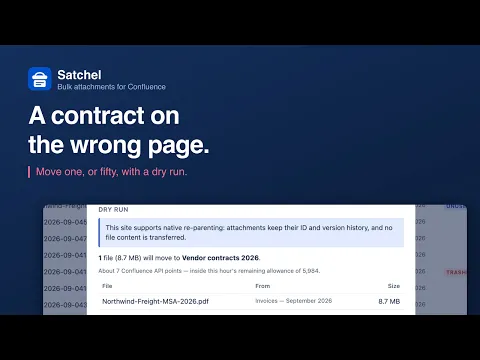
Move attachments in bulk
Confluence moves one file at a time; bulk move (CONFCLOUD-15025) has been open since 2009 with no plans to prioritize it. Satchel moves many at once: pick the files and the target page, read a dry run, undo it after.
A whole space in one zip
Confluence downloads one page’s files at a time. Select files across pages and download one archive, foldered by page title, with a CSV manifest inside. Built in your browser: nothing reaches our servers.
Find what nobody is using
Files on deleted or archived pages, files still in the trash, and attachments no page body references. Duplicate candidates grouped by name and exact size, with the space each group would reclaim.
Supporting media
More details
The problem
Confluence moves attachments one at a time, from each file's Properties, and downloads them one page at a time. Bulk move has been requested since 2009 (CONFCLOUD-15025); in 2022 Atlassian said it has no plans to prioritize it. A whole space cannot be downloaded at once.
What Satchel does
Move attachments between pages, many at once. Pick the files, pick a target, read a dry run: what will move, what will not and why. Undo afterwards.
Download a space as a zip, foldered by page title, with a CSV manifest inside. Built in your browser.
Find dead weight. Files on deleted or archived pages, files in the trash, and files no page body references. Duplicate candidates grouped by name and exact size.
See where it went. Storage by page, uploader and file type, plus the largest files. Export any of it as CSV.
Good to know
Bulk delete is off until an admin enables it, deletions go to the trash, and every one is recorded. Satchel never edits pages.
Resources
App documentation
Comprehensive set of documentation from the partner on how this app works
Privacy and Security
Privacy and security questionnaire has been filled by the partner
Privacy policy
Atlassian's privacy policy is not applicable to the use of this app. Please refer to the privacy policy provided by this app's partner.
Partner privacy policySecurity program
This app is not part of the Marketplace Bug Bounty program.
Integration permissions
Satchel — Bulk Attachments for Confluence integrates with your Atlassian app
Version information
Version 2.7.0•for Confluence Cloud
- Release date
- Sep 26th 2026
- Summary
- Minor version update
- Details
- Minor version update
- Payment model
- Paid via Atlassian
- License type
- Commercial