OVERALL RATINGS
INSTALLS
1
SUPPORT
- Partner Supported
TRUST SIGNALS
Key highlights of the appBuild a tech radar in a Confluence page: enter blips in a table, paste from a spreadsheet, or upload CSV or radar.js JSON
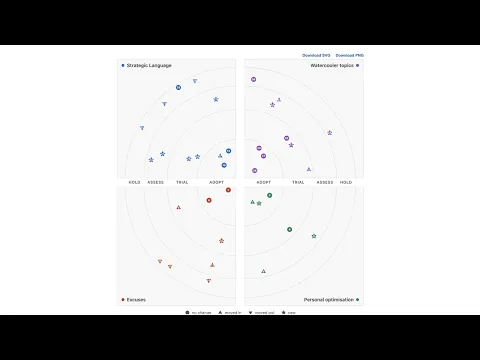
Your tech radar, in the page teams already read
Render the radar directly in Confluence, beside the architecture decisions it explains. No hosted site, no build pipeline, and no external link to chase. The blip list lives in the page body as canonical text.
Type it, paste it, or upload it
Enter blips in a table, paste rows straight from a spreadsheet, or upload a CSV or radar.js JSON file. Quadrant names and colours sit in the same editor, and the list downloads back out as CSV or JSON at any time.
The blip list never leaves Atlassian
Blip lists name internal technology choices some organisations treat as sensitive. The radar renders client-side, declares no Forge scopes and no egress, and stores nothing beyond the page, so it stays inside Confluence.
Supporting media
More details
The macro draws a quadrant tech radar in the Confluence page from a blip list kept in the macro itself. Enter blips in a table (name, ring, quadrant, movement, optional description and link), paste rows straight from a spreadsheet, or upload a CSV (Thoughtworks build-your-own-radar convention) or radar.js JSON file. The renderer displays every blip it can and lists any it cannot.
The list stays as text in the page body, so a ring change re-renders the same layout and shows in the page history.
Quadrant names and colours are yours to set; rings are Adopt, Trial, Assess and Hold.
A radar holds up to 400 blips.
- Movement markers and a numbered legend by quadrant and ring.
- Hover cards with descriptions; same-site links open in Confluence.
- Download the radar as SVG or PNG, with the numbered key beneath.
- PDF export keeps the chart; Word export gives a table with descriptions and links.
Data privacy: renders client-side, no Forge scopes, no egress, so your data stays in Confluence.
Resources
App documentation
Comprehensive set of documentation from the partner on how this app works
Privacy and Security
Privacy and security questionnaire has been filled by the partner
Privacy policy
Atlassian's privacy policy is not applicable to the use of this app. Please refer to the privacy policy provided by this app's partner.
Partner privacy policySecurity program
This app is not part of the Marketplace Bug Bounty program.
Version information
Version 2.5.0•for Confluence Cloud
- Release date
- Sep 6th 2026
- Summary
- Table editor, spreadsheet paste, file upload, image downloads with key
- Details
The macro editor is now a table: enter blips row by row (name, ring, quadrant, movement, optional description and link), set quadrant names and colours above it, and switch to a text view to edit the list as CSV or radar.js JSON. Paste rows straight from a spreadsheet; upload a CSV, JSON or TXT file (up to 512 KiB); download the list as CSV or JSON.
Downloaded SVG and PNG images now carry the numbered key beneath the chart.
A radar holds up to 400 blips, with an on-chart warning if a quadrant is too crowded to draw every blip.
- Payment model
- Paid via Atlassian
- License type
- Commercial