OVERALL RATINGS
INSTALLS
1
SUPPORT
- Partner Supported
TRUST SIGNALS
Key highlights of the appPage approval workflow for Confluence: request, sign off, re-approve on expiry. Approvals pin the exact version they approved
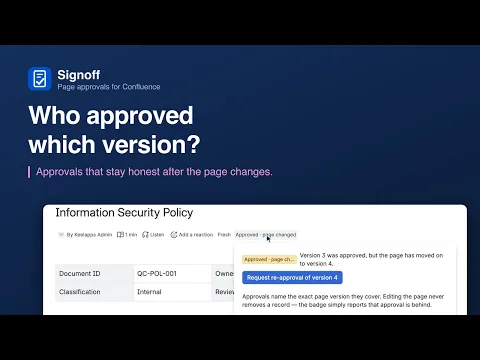
Approvals that cannot lie
An approval pins the exact page version it covered. Edit the page and the badge degrades to “page changed” on its own — status is computed live, never stored, and re-approval is one click away.
One policy, every space
Define approvers, mode and validity once; spaces bind by reference or simply inherit the site default. Editing the policy updates every bound space at once — nothing is ever copied between spaces.
Nothing leaves Atlassian
Built on Forge with zero external calls: approval records live in Forge storage on your own site. Notifications ride Confluence’s own comments and @mentions — no email server, no outside service.
Supporting media
More details
Confluence cannot answer “who approved this version of this page, and is that approval still good?” Signoff can.
Request sign-off in one click. Approvers come from the space’s policy or your own pick, any-one or all-must-approve. They are @-mentioned in a page comment, so the request reaches them through Confluence’s own bell and email.
Version-aware status: an approval names the page version it covered. Editing the page turns the badge to “Approved - page changed” on its own.
Policies without copy-paste: define approvers, mode and validity once; spaces bind by reference or inherit the site default.
Expiry: approvals can expire after 3-24 months; a daily scan surfaces everything due for re-approval.
Audit trail: export every request and decision as CSV - who approved which version of which page, when.
Signoff never edits your pages. Its only write is the notification comment, and site admins can switch that off.
Resources
App documentation
Comprehensive set of documentation from the partner on how this app works
Privacy and Security
Privacy and security questionnaire has been filled by the partner
Privacy policy
Atlassian's privacy policy is not applicable to the use of this app. Please refer to the privacy policy provided by this app's partner.
Partner privacy policySecurity program
This app is not part of the Marketplace Bug Bounty program.
Integration permissions
Signoff — Page Approvals for Confluence integrates with your Atlassian app
Version information
Version 2.1.0•for Confluence Cloud
- Release date
- Sep 7th 2026
- Summary
- First public release: version-aware page approvals with policies and expiry.
- Details
Signoff brings lightweight, version-aware page approvals to Confluence Cloud. This first release includes:
One-click sign-off requests with any-one or all-must-approve, optional notes, and approver @-mentions through Confluence’s own notifications.
Version-aware status on every page: approvals pin the exact version they covered, and the badge reports “page changed” the moment anyone edits.
A policy library: define approvers, mode and validity once, bind spaces by reference, or let them inherit the site default.
Approvals that expire: 3-24 month validity with a daily scan surfacing everything due for re-approval.
A personal approvals inbox: decide from the queue, track your requests, see what you signed that has since expired.
A site-wide audit trail with CSV export.
Runs on Atlassian: no external calls, records never leave your site.
- Payment model
- Paid via Atlassian
- License type
- Commercial