OVERALL RATINGS
SUPPORT
- Partner Supported
Key highlights of the appHTML, Rich Text & Markdown, Signature, Button, Card, Latex, Mermaid, graphviz, Plantuml, Swagger and OpenAPI
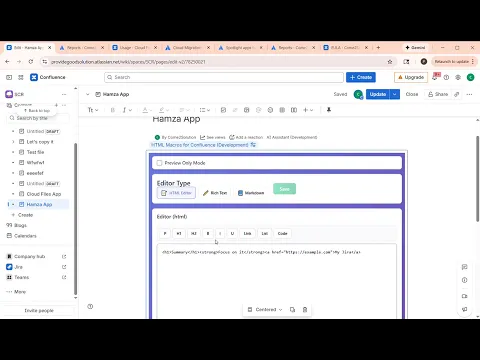
HTML Editor and Preview
📝 HTML Editor: Direct HTML input with smart toolbar for tags, instant formatting, and live preview. Perfect for developers needing precise control.
Signature
✍️ Digital Signature Macro – Create, save & reuse electronic signatures in Confluence. Supports 🎨 hand-drawn & 🔤 typed signatures. 💾 Save once, sign anywhere. Perfect for approvals & acknowledgments! ✅
Card picture and descriptoin setting
📘 Card Macro: Choose from 1-5 columns
- Flexible Image Positioning: Top, left, right, or no image
- Customizable Colors: Individual card background and text colors
- Rich Card Content: Title, description, image, and links
More details
🎯 HTML Macro - A versatile 3-in-1 content editor for Confluence with HTML, Rich Text, and Markdown editing modes. Features live preview, auto-save, and clean view mode toggle.
- 📝 HTML Editor - Direct HTML editing with formatting toolbar
- ✏️ Rich Text Editor - WYSIWYG editor (React Quill based)
- 📘 Markdown Editor - Markdown syntax with cheat sheet
- 👁️ Live Preview - Real-time content rendering
✍️ Digital Signature Macro – Create, save & reuse electronic signatures in Confluence. Supports 🎨 hand-drawn & typed signatures. 💾 Save once, sign anywhere. Perfect for approvals & acknowledgments! ✅
🔤Button Macro allows you to create beautiful, customizable buttons with various styles, shapes, and sizes that link to any URL.
📘Card Macro - A flexible, customizable card macro that allows you to create visually appealing card layouts directly in Confluence pages.
Resources
App documentation
Comprehensive set of documentation from the partner on how this app works
Privacy and Security
Privacy policy
Atlassian's privacy policy is not applicable to the use of this app. Please refer to the privacy policy provided by this app's partner.
Partner privacy policySecurity program
This app is not part of the Marketplace Bug Bounty program.
Integration permissions
Formatting for Confluence integrates with your Atlassian app
Version information
Version 5.0.0•for Confluence Cloud
- Release date
- Feb 19th 2026
- Summary
- Minor version update
- Details
- Minor version update
- Payment model
- Paid via Atlassian
- License type
- Commercial