OVERALL RATINGS
SUPPORT
- Partner Supported
TRUST SIGNALS
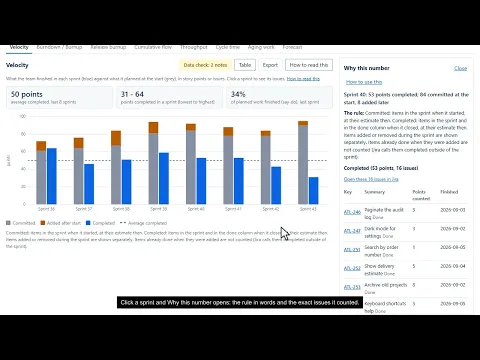
Key highlights of the appAgile metrics for Jira: time in status, cycle time, velocity, flow and Monte Carlo forecasts, with the issues behind every number
See how long work sits in each status
Average, median or 85th percentile time in each status or board column, from each issue's whole history. Click a bar to see every issue that was there, longest first, with its time and how many visits it made.
Know when the data is too thin to trust
Every chart has a data check that names, with the issues, what could skew it: no estimate, a skipped start column, work moved backwards, carried-over sprints, too little history. If nothing does, it says so.
Forecast from your own history
Monte Carlo forecasts replay your team’s own history 10,000 times to answer When will it be done? and How many by a date? at 50, 70, 85 and 95%. The same inputs always give the same answer.
Supporting media
More details
Runs on Atlassian: the app declares no outbound network access, uses only Atlassian's own hosting and storage, and has no analytics.
Personal data: each person's saved views of boards and projects are kept in Atlassian's Forge storage under their account id. The app reports those account ids to Atlassian weekly and erases a closed account's views. Remembered settings and views of a JQL query stay in the person's own browser.
Reads Jira as the person looking and makes no change to it: no write permission is requested.
Accessible: targets WCAG 2.1 AA in Jira's light and dark themes, works with the keyboard alone, and has a table view of every chart.
Jira Cloud. English.
Resources
App documentation
Comprehensive set of documentation from the partner on how this app works
Privacy and Security
Privacy and security questionnaire has been filled by the partner
Privacy policy
Atlassian's privacy policy is not applicable to the use of this app. Please refer to the privacy policy provided by this app's partner.
Partner privacy policySecurity program
This app is not part of the Marketplace Bug Bounty program.
Integration permissions
Stattora: Time in Status, Cycle Time and Metrics for Jira integrates with your Atlassian app
Version information
Version 3.4.0•for Jira Cloud
- Release date
- Nov 10th 2026
- Summary
- Office hours: Time in status can count working hours only
- Details
Office hours for Time in status.
- Settings, More options: tick Count only office hours on Time in status and set when your team opens and closes, with an optional break. Time in status then counts working hours: only the time inside those hours on your working days, not on holidays, in your Jira time zone. A night or a weekend in a status adds nothing; a move in before opening counts from opening.
- Clock changes are handled: 09:00 to 17:00 is 8 hours on those days too.
- Why this number and the data check say when office hours are on, and the data check names issues whose stay was entirely outside them.
- Off by default, so nothing changes until you turn it on. Cycle time, lead time, aging and forecasts still count whole days.
No new permission. The app still makes no change to Jira.
- Payment model
- Paid via Atlassian
- License type
- Commercial