OVERALL RATINGS
INSTALLS
8
SUPPORT
- Partner Supported
TRUST SIGNALS
Key highlights of the appDescribe it, AI draws it — Excalidraw diagrams in Confluence. Free up to 10 users; AI runs on Atlassian, nothing leaves your site
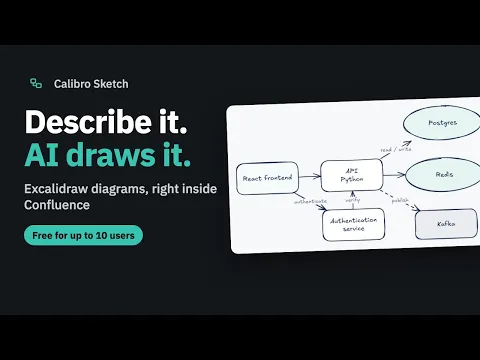
Describe a system, get an editable diagram
Type what you’re building — “a React frontend talks to a Python API using Postgres” — and Sketch draws real, editable elements, laid out and wired. The AI is Atlassian-hosted Claude; nothing leaves your site.
Live page cards that cannot go stale
Insert an Atlassian object by searching or pasting a link. A Confluence page card stores only the URL — its title and state are fetched when someone looks, so the diagram never disagrees with the page.
Add one with /sketch, or from the space sidebar
Add the sketch macro to any page to drop in a new or existing diagram — or open the Sketch section in the space sidebar to browse everything the space has, as tiles or a list.
Supporting media
More details
Describe a system in a sentence — “a React frontend talks to a Python API, using Postgres and Redis” — and Sketch draws it: real, editable Excalidraw elements, laid out and wired up. The drawing is saved as real content in your Confluence site, and the AI runs on Atlassian-hosted Claude models — nothing leaves your site.
Quick start:
- Pick Sketch in a space’s sidebar. Describe what you’re building and AI draws it — or start blank. It saves as you go.
- Refine from the command bar — add a service, rename a store, put a queue between two boxes. Undo works on everything.
- Click Atlassian object to add live Confluence page cards that read their state at view time — they never go stale.
- One diagram, edited once, current everywhere — embed it on any page by typing /sketch
- In English, German, Spanish, French and Portuguese
Pricing: free for up to 10 users, the whole app, no time limit. From the 11th user, US$0.25 per user per month, billed by Atlassian with your Confluence subscription.
Resources
App documentation
Comprehensive set of documentation from the partner on how this app works
Privacy and Security
Privacy policy
Atlassian's privacy policy is not applicable to the use of this app. Please refer to the privacy policy provided by this app's partner.
Partner privacy policySecurity program
This app is not part of the Marketplace Bug Bounty program.
Integration permissions
Calibro Sketch: Excalidraw Diagrams for Confluence integrates with your Atlassian app
Version information
Version 5.4.0•for Confluence Cloud
- Release date
- Oct 26th 2026
- Summary
- Minor version update
- Details
- Minor version update
- Payment model
- Paid via Atlassian
- License type
- Commercial