Free app
OVERALL RATINGS
INSTALLS
278
SUPPORT
- Partner Supported
TRUST SIGNALS
Key highlights of the appMake static screens dynamic - control field behaviours on Issue View, Create, and Transition screens
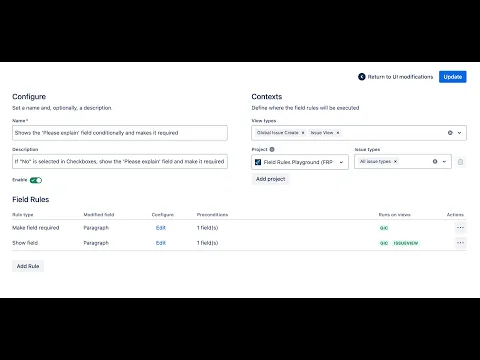
Transform issue screens into live forms
Change the behavior of the Create Issue screen, Issue view, or Transition. Show or hide fields | Make fields required or read-only (lock) | Hide issue types or field options | Enforce self-assignment | Pre-fill field
Fields and user preconditions
You can set two types of conditions: field-based, using any UIM fields, and user-based, targeting specific groups, roles, or individuals. A wizard-like interface allows you to control when and for whom the rule applies
One UI Modification for many projects
Choose which view types to modify and how. Group Field Rules that target the same fields for sequential execution. Easily expand existing UI modifications to new projects, ensuring consistency across multiple contexts
Supporting media
More details
Here are some versatile use cases that highlight the app’s flexibility:
- Multilevel selection: Guide users through cascading field choices, dynamically revealing fields and simplifying complex workflows.
- Self-assignment only: Ensure tasks can only be assigned to the user performing the action.
- Conditional fields: Reveal and require the 'Please explain' field based on user input.
- Editable fields: Lock a field in certain statuses while allowing release managers to edit it as needed.
- Hide options: Clean up your interface by hiding obsolete issue types or irrelevant checkboxes. Keep your workflow focused and efficient.
Currently supported views and project types:
- Global Issue Create: company-managed and team-managed Jira Software & Jira Work Management
- Issue View: company-managed and team-managed Jira Software
- Issue Transition: company-managed Jira Software
Read more about what is possible and the app's limitations in the documentation.
Secure by design, powered by Forge.
Resources
App documentation
Comprehensive set of documentation from the partner on how this app works
Privacy and Security
Privacy policy
Atlassian's privacy policy is not applicable to the use of this app. Please refer to the privacy policy provided by this app's partner.
Partner privacy policySecurity program
This app is not part of the Marketplace Bug Bounty program.
Integration permissions
Field Rules - UI Modifications for Jira integrates with your Atlassian app
Version information
Version 2.30.0•for Jira Cloud
- Release date
- Mar 14th 2026
- Summary
- New Rules Engine - that makes rule execution more powerful and predictable
- Details
🚀 New Rules Engine
- Multiple rules can now operate on the same field without canceling each other out. This allows you to define several rules for a single field that run under different conditions.
- Rules are now aware of changes made by earlier rules. This enables powerful rule chains. For example, you can create a sequence of rules that pre-fill field values based on values set by earlier rules.
✨ New Rules
- Use Description - allows you to dynamically change the description of a field
- Change Value - updates a field value when another field is changed by the user
Rule Behavior Changes
- Conditions based on Issue Type are now supported on Issue View.
- Enable Self-Assignment rule can now be applied on Issue View.
- Options hidden by a rule on Transition View will now be cleared if they were previously selected.
Configuration Improvements
- Rules can now be reordered within a UI Modification (UIM).
- You can now enable or disable a UI Modification directly from the main configuration view.
- Payment model
- Free
- License type
- Commercial - no charge