OVERALL RATINGS
INSTALLS
467
SUPPORT
- Partner Supported
TRUST SIGNALS
Key highlights of the appFlowcharts, sequence diagrams, Gantt charts, class diagrams + 12 more — syntax highlighting, full-screen viewer, PNG/SVG export
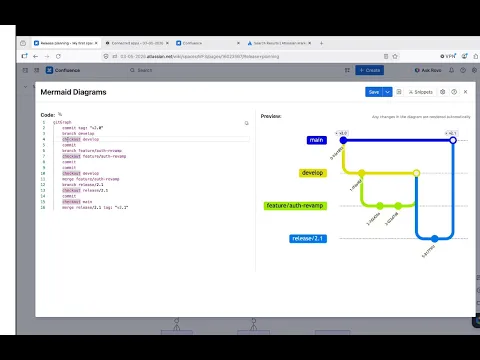
Syntax-highlighted editor
Write Mermaid faster and with fewer errors. The redesigned editor highlights Mermaid syntax in real time, so you catch mistakes as you type - not after you save. Write complex diagrams with confidence.
16 diagram types in one macro
Flowcharts, sequence diagrams, Gantt charts, class diagrams, ER diagrams, state machines, mindmaps, timelines, XY charts and more - all from a single macro, all in one place.
Export diagrams as PNG, SVG, or copy to clipboard
Save any diagram as a PNG or SVG file, or copy it directly to the clipboard - ready for slides, documents, or design tools. Diagrams also render correctly when exporting Confluence pages to PDF or Word.
Supporting media
More details
Create flowcharts, sequence diagrams, Gantt charts, class diagrams, and 12 more diagram types in Confluence using plain Mermaid syntax — no external tools required.
Features:
- Syntax-highlighted editor with live preview
- Full-screen SVG viewer with zoom and pan
- Export as PNG, SVG, or copy to clipboard
- PDF and Word export compatible
- Diagrams stored as page attachments — survive page copies and moves
- Visible to anonymous users and Confluence guests
Supported diagram types:
- Flowchart
- Sequence Diagram
- Class Diagram
- State Diagram
- Entity Relationship Diagram
- User Journey
- Gantt
- Pie Chart
- Quadrant Chart
- Requirement Diagram
- Gitgraph (Git) Diagram
- Mindmaps
- Timeline
- Sankey
- XYChart 🔥
- Block Diagram 🔥
Also need diagrams on Jira work items? We've got you covered →
Resources
App documentation
Comprehensive set of documentation from the partner on how this app works
Privacy and Security
Privacy policy
Atlassian's privacy policy is not applicable to the use of this app. Please refer to the privacy policy provided by this app's partner.
Partner privacy policySecurity program
This app is not part of the Marketplace Bug Bounty program.
Integration permissions
Apportunity: Mermaid Diagrams Macro for Confluence integrates with your Atlassian app
Version information
Version 6.0.0•for Confluence Cloud
- Release date
- Oct 9th 2026
- Summary
- ✨ Mermaid 12: new looks, ELK layouts, themes and architecture icons
- Details
✨ Mermaid 12
Diagrams now render with Mermaid 12.1, the same engine as the official Mermaid Live Editor. Code you copy from mermaid.live renders the same on your pages, and the other way round.
- New default look (
neo) and colors (redux-color) for flowchart, sequence, class, state, ER and requirement diagrams - ELK layout by default: tidier diagrams with fewer crossing lines
- New themes, each with a dark variant, and the hand-drawn look
- Diagrams without a theme follow each reader's light or dark mode
- More diagram types, including Kanban, packet, use case and Venn diagrams
☁️ Architecture diagrams with icons
Draw cloud and service architecture with product logos (
logos:aws-lambda,logos:kubernetes) and general icons (mdi:server). The icons ship inside the app, so nothing is loaded from outside Atlassian.⚡ Faster snippet gallery
Snippet previews are pre-rendered, so the gallery opens instantly. New snippets show architecture icons and the theme, look and layout settings.
Existing diagrams look different?
Mermaid 12 changed its default look and layout, as in every app that uses it. Your diagram code is unchanged. To bring back the previous layout and shapes, add a
configblock withlayout: dagreandlook: classicat the top of the diagram: docs.apportunity.xyz/mermaid-diagrams/diagram-theming#keep-the-previous-lookMermaid 12 needs Safari 17.4 or later, or a current Chrome, Edge or Firefox.
- New default look (
- Payment model
- Paid via Atlassian
- License type
- Commercial