
OVERALL RATINGS
INSTALLS
90
SUPPORT
- Partner Supported
TRUST SIGNALS
Key highlights of the appSee and update your Jira Assets on any Jira dashboard, from one or several Jira sites, with a single license
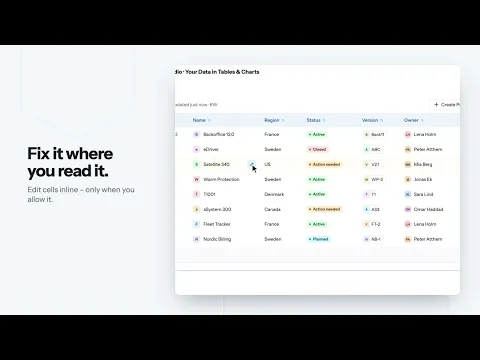
Update assets without leaving the dashboard
Change a value, add a new asset or remove one, directly in the table on your dashboard. Editing is off until an admin turns it on, and only the people you choose can make changes.
See how your assets connect
Open the Object Graph on any asset to see what it links to and what links to it. Click through, filter by link type, zoom, and open the asset in Assets when you need more.
Tables, cards and charts from several Jira sites
Choose a table, vertical table, card, pie or bar chart. Show assets from more than one Jira site on the same dashboard. Charts follow your light or dark theme.
Supporting media
More details
Asset Studio shows your Jira Assets on Jira and JSM dashboards as tables, cards or charts, and lets you change the data from the dashboard. Assets from several Jira sites can be shown on one dashboard.
Only the person who sets up a gadget needs a license.
Display
- Horizontal and vertical tables
- Cards for one asset at a time
- Pie and bar charts
- Object Graph: how an asset is linked to others
- Light and dark mode
- Filter with menus or AQL builder, sort, search, CSV, print
Edit, create and delete
- Change values in the table, add or remove assets
- Off by default. Your admin decides, per connection, who may edit what
- Every change is logged for 90 days
More
- The Studio: work with your assets in one place, no gadget needed
For example
- IT: laptops with owner and warranty end date
- Servicedesk: update an asset’s status right from the dashboard
- Any asset, any schema. If it is in Assets, you can show it
Need it for Confluence pages? -> Confluence.
📽️ Demo
📽️ Referenced objects
Resources
App documentation
Comprehensive set of documentation from the partner on how this app works
Privacy and Security
Privacy policy
Atlassian's privacy policy is not applicable to the use of this app. Please refer to the privacy policy provided by this app's partner.
Partner privacy policySecurity program
This app is part of the Marketplace Bug Bounty program.
About Bug Bounty programIntegration permissions
Asset Studio – Create, Edit & Visualize Assets in Jira integrates with your Atlassian app
Version information
Version 8.16.0•for Jira Cloud
- Release date
- Oct 22nd 2026
- Summary
- Edit, create and delete assets, new Object Graph, new design
- Details
- Edit, create and delete assets from your Jira dashboard
You can now change Jira Assets data directly in the table on your dashboard. Editing is off by default. An admin turns it on per connection, chooses which Jira groups may make changes and which schemas can be changed. All changes are logged. - Object Graph
A new view that shows how an asset is linked to other assets, with click-through navigation, link-type filters and zoom. - New design
Redesigned tables, cards and charts. Dark mode. A sticky first column. Striped rows and row density options. An improved AQL editor with highlighting and examples.
- Edit, create and delete assets from your Jira dashboard
- Payment model
- Paid via Atlassian
- License type
- Commercial