SharePoint Connector for Jira (Microsoft OneDrive)

OVERALL RATINGS
INSTALLS
1,718
SUPPORT
- Partner Supported
TRUST SIGNALS
Key highlights of the appIntegrate SharePoint and OneDrive from Microsoft 365 with Jira to manage files, automate folders, and collaborate securely
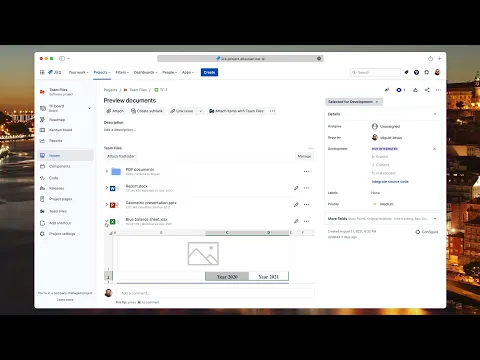
Connect SharePoint files & folders to Jira issues
Share files and folders from SharePoint or OneDrive directly in Jira projects and issues. Give teams fast access without switching tools. Take a guided tour or book a live demo to see it in action.
Automation and file system workflows
Automatically create and connect SharePoint folders to Jira issues and projects. Upload files back to SharePoint from Jira, rename or delete files, embed Excel, Word, and PowerPoint with advanced layouts.
Enterprise security and permissions
Mirror SharePoint permissions or control access using Jira users and groups. Keep documents secure, avoid duplicates, and ensure files are never stored in Jira.
Supporting media
More details
SharePoint Connector for Jira lets teams work with SharePoint and OneDrive from Microsoft 365 directly inside Jira, while keeping SharePoint as the single source of truth.
- Browse folders and subfolders, embed files or folders on Jira issues, upload files to SharePoint from Jira, and rename or delete documents without duplicating content.
- Automatically create and connect folders to Jira issues and projects using folder automation, so documents stay organized across Jira workflows.
- Teams collaborate on Excel, Word, PowerPoint, PDFs, and more, always working with the latest version stored in SharePoint. AI-powered summaries help teams review documents faster and keep issues moving.
- Admins can mirror SharePoint permissions or manage access using Jira users and groups. Files are never stored in Jira. Data residency is supported, with compliance for EU GDPR and US CCPA requirements.
Watch the product demo or book a live demo to explore SharePoint and OneDrive workflows inside Jira.
Resources
Descriptor
Get the descriptor file downloaded to your system
App documentation
Comprehensive set of documentation from the partner on how this app works
Privacy and Security
Privacy policy
Atlassian's privacy policy is not applicable to the use of this app. Please refer to the privacy policy provided by this app's partner.
Partner privacy policySecurity program
This app is part of the Marketplace Bug Bounty program.
About Bug Bounty programIntegration permissions
SharePoint Connector for Jira (Microsoft OneDrive) integrates with your Atlassian app
Version information
Version 1.1.36-AC•for Jira Cloud
- Release date
- Aug 7th 2025
- Summary
- Minor version update
- Details
Minor version update
- Payment model
- Paid via Atlassian
- License type
- Commercial