OVERALL RATINGS
INSTALLS
43
SUPPORT
- Partner Supported
TRUST SIGNALS
Key highlights of the appRefine the backlog, fix story quality & plan sprints against team velocity and capacity, on one screen
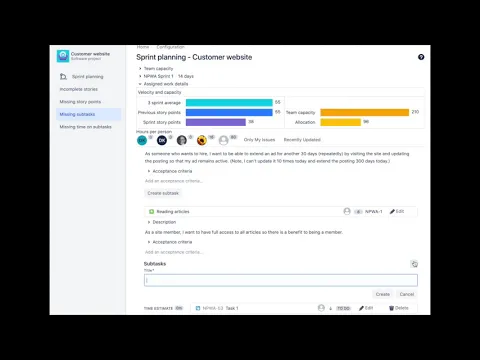
Capacity planning & resource planning in Jira
Plan team capacity in hours or story points and see committed work vs effective capacity. Holidays, time off and days off adjust each person's real availability automatically.
Avoid over-commitment
Divim's Backlog refinement and Sprint planning for Jira allows the team to see their current sprint load and their past velocity.
Teams planning in hours can see the allocate hours compared to planned capacity.
Show and Hide the subtasks in sprints and backlog
Teams using subtasks for planning and tracking will find all the stories with missing subtasks, will create subtasks on the spot, and they will assign hours on the same screen without losing focus.
Supporting media
More details
The app runs entirely inside Atlassian's cloud with no data egress, so your planning data never leaves Atlassian, with enterprise-grade security, reliability and support.
Refine the backlog, improve story quality, and plan sprints based on real team velocity, all on one screen in Jira. Unique filters surface the work that derails sprints:
- Stories that don't follow the As-a / I-want / So-that format
- Stories missing story points
- Stories with no subtasks
- Subtasks with no time estimate
A load bar compares the current sprint to past velocity, so teams stop over- and under-committing. Plan in points or hours; create subtasks and assign time inline. Latest release notes · Learn more on divim.io →
Resources
App documentation
Comprehensive set of documentation from the partner on how this app works
Privacy and Security
Privacy and security questionnaire has been filled by the partner
Privacy policy
Atlassian's privacy policy is not applicable to the use of this app. Please refer to the privacy policy provided by this app's partner.
Partner privacy policySecurity program
This app is part of the Marketplace Bug Bounty program.
About Bug Bounty programIntegration permissions
Backlog Refinement, Sprint & Capacity Planning for Jira integrates with your Atlassian app
Version information
Version 6.7.0•for Jira Cloud
- Release date
- Sep 3rd 2026
- Summary
- AI-assisted backlog refinement for Jira — Definition-of-Ready story grading, drafting and backlog health — alongside sprint and capacity planning. Includes the Connect-to-Forge migration path.
- Details
AI-assisted backlog refinement, and the move off Connect. This release brings AI story grading and drafting into backlog refinement for Jira, alongside the sprint planning and capacity planning you already use, and carries the migration path that brings Connect installs onto Forge with their data.
Fixes now reach you without waiting — the migration connection still needs consent
The app has moved to rolling releases. New code reaches installations as it ships, so bug fixes no longer wait behind an admin accepting a new major version.
Permissions are handled separately. This version declares a connection to the Connect backend (
spadvanced.divim.io) for a one-time data pull during migration, and that connection needs a Jira admin's consent. Until it is granted the app runs normally and simply does not use it. Requests to it carry a signed Forge Invocation Token that the Connect endpoint verifies, so the channel is authenticated rather than an open fetch.One consequence worth stating plainly: declaring that connection means this version does not carry the Runs on Atlassian badge, which 5.x did. This is deliberate and temporary — the connection exists only to move Connect customers across, and removing it once they have migrated restores eligibility. Nothing else about where your data lives has changed: planning data still lives in Atlassian storage, and the AI still runs on Atlassian-hosted models.
AI is off until you turn it on, per board
AI analysis is disabled by default on every board. A project or board admin switches it on after acknowledging a data notice explaining what is sent: the issue summary and description go to Atlassian-hosted models — never to a third-party AI service. Turning it back off stops every model call for that board immediately; the rule-based views keep working exactly as before.
Story readiness, graded against a Definition of Ready you control
Refinement flags used to be pattern matching: a story that did not literally say “As a … I want … so that …” was marked incomplete however well it was written. Stories are now judged by meaning — in any phrasing, in any language — against seven criteria:
- Who, what and why — the narrative, judged semantically
- Acceptance criteria — present, and draftable in place when they are not
- Testability — could someone write a test from this?
- Sizing — small enough to finish in one sprint
- Dependencies — is the story blocked by something unstated?
Each criterion comes back as met or not met, with a confidence and a one-line rationale, so a verdict can be argued with rather than just accepted. Any criterion can be switched off for your install if it does not match how your teams work.
The readiness score (0–100) is the percentage of criteria met. It is computed arithmetically from the graded results — the model is never asked to do the arithmetic. Each verdict also records which model produced it.
Nothing is re-analysed without a reason
A verdict is cached against a hash of the story text and the checklist it was graded against. An unchanged story is never re-graded; editing the story, or changing the checklist, invalidates the cache naturally.
Whole-backlog analysis
A backlog sweep grades an entire board, 25 issues per pass, resuming from a durable cursor so a 1,000-issue board finishes without dropped issues and picks up where it left off after any interruption. Only stories are graded — never epics or sub-tasks.
Issues already in a sprint are now included. Jira's backlog endpoint excludes them, so previously any story pulled into an active or future sprint stopped appearing in the quality views. The sweep now picks up active and future sprint issues as well.
A completed sweep will not re-run for six hours — the per-issue trigger already re-grades edited stories within seconds, so nothing goes stale in between. If a sweep is throttled it says so rather than quietly doing nothing, and a failed sweep can be retried immediately.
Backlog health, and a refinement agenda
The health report gives a board a score, counts of how many stories are ready, graded and suppressed, a breakdown of which criterion is failing most often, and a worst-first agenda — up to twenty stories most in need of attention, which is a refinement session's running order. It is computed from already-stored results, so asking for it costs no Jira calls and no model calls. A snapshot is recorded after each sweep, so the score becomes a trend.
An optional plain-language summary of the report can be generated by AI and is labelled as such. If it fails, the report still answers — the numbers never depend on it.
Suggestions you review, and apply as yourself
- Rewrite — a redraft of summary and description, with the reasoning behind it.
- Acceptance criteria — up to ten, editable line by line before they are appended to the description.
- Split — offered for stories of eight story points or more, and for stories not yet estimated, proposing up to four parts. Accepting creates them as real issues, linked back to the original.
- Estimate — a suggested figure that cites comparable completed issues from your own board. Cited keys are checked against the issues actually fetched, so a suggestion cannot reference an issue that does not exist.
Nothing is applied automatically. When you accept a suggestion the change is written to Jira as you, so it appears under your name in the issue history rather than as an app edit. Every applied suggestion also records an audit entry — who, when, which kind, and a hash of the content. The story text itself is not stored in that record.
Drafts appear as they are written
Rewrites and acceptance criteria stream into the panel as they are produced instead of holding a spinner. Each update carries the full draft rather than a fragment, so a slow connection converges on the right text rather than showing gaps. Drafts are private to the person who asked for them, and the app confirms you can read an issue before drafting anything for it. If a draft fails it says so and falls back — a partial draft is never presented as finished.
Ask in Rovo chat
The Backlog Refinement Coach answers in Rovo chat and from issue context: analyse a story, suggest a rewrite, generate acceptance criteria, suggest a split, suggest an estimate, or report on backlog health. It runs with your own Jira permissions, so it can only see issues you can see, and it honours the per-board AI setting. The reasoning runs inside your organisation's own Rovo entitlement.
It degrades; it does not fail
If AI is unavailable — no licence, board switched off, a service problem, or the monthly allowance spent — analysis steps down rather than breaking. A previous verdict is served where one exists, otherwise the rule-based engine answers. Your board always loads. When a model declines to answer a particular story, the app says so plainly instead of offering a retry that cannot help.
AI usage is included in your subscription; there is no separate AI billing. Each install has a generous monthly ceiling, and past it analysis falls back to the rule-based engine until the month rolls over.
The numbers stay exact
Story points, sub-task and time-estimate checks, sprint velocity, capacity planning arithmetic and the health score are all computed from Jira data and never sent to a model.
Fixes
- Capacity data for a sprint now always settles instead of leaving the view mid-load.
- Sprint issue fetches always settle, rather than failing silently behind a loading state.
- Closing the issue dialog no longer triggers a refetch for an undefined sprint.
- The issue trigger now tolerates an issue that has been deleted or is not visible, instead of erroring.
- A story the model declines to grade now falls back to the rule-based result instead of being left with no analysis at all.
- A failed AI draft is now visible rather than silently showing static coaching text.
- A draft whose stream never delivers falls back instead of spinning indefinitely.
- Issues can again be dragged into an empty sprint.
- Corrected layout of the AI indicator on story rows.
- Payment model
- Paid via Atlassian
- License type
- Commercial