Bulk Clone Professional for Jira

OVERALL RATINGS
INSTALLS
709
SUPPORT
- Partner Supported
TRUST SIGNALS
Key highlights of the appBulk clone Jira issues, epics, subtasks & projects. Enterprise-grade control with accessible pricing
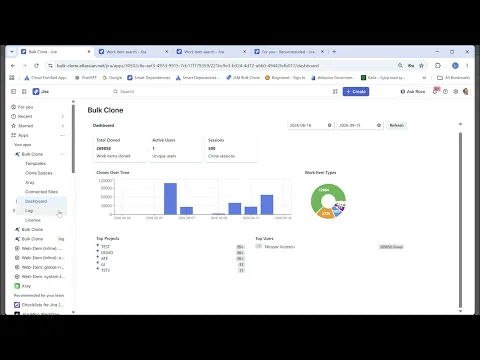
Set Up Once, Clone at Scale — Total Admin Control
Give your team a fully configured cloning environment from day one. Manage templates, presets, XRay integrations, and org-wide clone history — all from one central admin panel.
Clone Smarter — Full Control Over Every Detail
Choose exactly what gets cloned — subtasks, attachments, comments, labels, links, and status. Edit custom field values on the fly and rebuild epic and parent hierarchies automatically.
Clone Across Projects — Merge, Map & Transform
Send cloned issues to any target project, map work types, and merge multiple sources into one. Alter custom and system field values on the fly — arriving perfectly structured in the destination project.
Supporting media
Editions New
This app offers two different editions - Standard and Advanced. You can start a free trial of either edition, and change your edition anytime during or after the trial.
Standard
Onboard your team and scale fast
Includes:
Clone spaces
Data residency support
Smart Templates
Save cloning options as templates
Xray test hierarchy cloning support
Advanced
Unlock the full range of app features
Everything from Standard, plus:
Workflow Post Function
More details
Bulk Clone Professional eliminates repetitive Jira setups, streamlines cross-project handovers, and tackles migrations native tools can't.
Who it's for: Jira Admins, PMs, Service Teams, QA Engineers, Atlassian Consultants.
Problems it solves
- Rebuilding the same projects, epics and issues from scratch
- Handovers that stall across teams and projects
- Migrations beyond native tool limits — clone entire spaces with schemes and configs
- Setting up xRay test hierarchies before every release
Key outcomes
- Smart Templates — Recurring clones run with zero setup, saved search included
- Launch a fully configured Jira space in under 3 minutes
- Schedule recurring clone jobs, or trigger them from Jira Automation
- Hand off tickets faster, less time lost in transition
Why Bulk Clone
- Trusted on Server and Data Center — now fully on Cloud
- Bulk Clone 100,000+ work items in one operation
- True Forge app, runs entirely on Atlassian Infrastructure with full Data Residency
Resources
App documentation
Comprehensive set of documentation from the partner on how this app works
Privacy and Security
Privacy and security questionnaire has been filled by the partner
Privacy policy
Atlassian's privacy policy is not applicable to the use of this app. Please refer to the privacy policy provided by this app's partner.
Partner privacy policySecurity program
This app is part of the Marketplace Bug Bounty program.
About Bug Bounty programIntegration permissions
Bulk Clone Professional for Jira integrates with your Atlassian app
Version information
Version 5.3.0•for Jira Cloud
- Release date
- Sep 11th 2026
- Summary
- Bulk Clone Professional for Jira — Introducing Advanced Edition
- Details
🚀 Bulk Clone Professional for Jira — Introducing Advanced Edition Up to 10x faster cloning, a brand-new clone form and smarter Xray cloning
NEW IN ADVANCED EDITION
⚙️ Clone automatically from a workflow Add Bulk Clone as a post function on a workflow transition and work items clone themselves. No one opens the app.
STANDARD EDITION
⚡ Huge speed improvements Up to 10 times more performance on cloning work items. A new Clone speed setting runs up to 50 work items in parallel, so large runs finish in a fraction of the time.
✨ A redesigned clone form A guided, tabbed setup with live progress on every run.
🧪 Xray: You only need to include the test plans, test executions & test sets and all the linked tests will be included Your cloned Xray structures arrive complete.
- Payment model
- Paid via Atlassian
- License type
- Commercial