Free app
OVERALL RATINGS
INSTALLS
3
SUPPORT
- Unsupported
TRUST SIGNALS
Key highlights of the appVisual asset gallery for Jira, browse, filter and download project assets at a glance
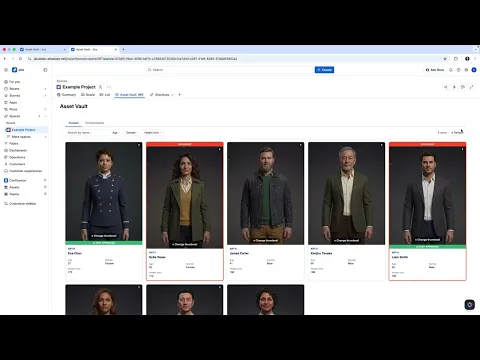
Visual Asset Gallery
Browse your Jira issues as a rich card grid with thumbnail images, custom field values, and color-coded highlight labels, all without leaving your project.
Fully Configurable
Set up multiple views per project, choose which fields appear on each card, define JQL-based highlight rules, and control who can manage thumbnails.
Smart Filtering
Filter cards instantly by any field value, including unset fields. Combine multiple filters and search by name to find exactly what you need.
More details
Asset Vault is a visual gallery for Jira projects, turning your issues into browsable cards with images, custom fields, and smart filtering.
Key features:
- Card grid view with thumbnail images sourced from issue attachments
- Configurable fields per card, showing exactly what matters to your team
- Highlight rules to frame cards with a color border or labels based on JQL conditions
- Flexible filtering by any field value, including unset fields
- Multiple views per project, each with its own JQL query or saved filter
- Portrait picker to let designated roles choose which attachment appears as the card thumbnail
- Built entirely on Atlassian Forge with no external servers and no data leaving Atlassian infrastructure
Resources
App documentation
Comprehensive set of documentation from the partner on how this app works
Privacy and Security
Privacy and security questionnaire has been filled by the partner
Privacy policy
Atlassian's privacy policy is not applicable to the use of this app. Please refer to the privacy policy provided by this app's partner.
Partner privacy policySecurity program
This app is not part of the Marketplace Bug Bounty program.
Integration permissions
Asset Vault integrates with your Atlassian app
Version information
Version 4.16.0•for Jira Cloud
- Release date
- Jun 15th 2026
- Summary
- Minor version update
- Details
- Minor version update
- Payment model
- Free
- License type
- Commercial - no charge