OVERALL RATINGS
SUPPORT
- Partner Supported
TRUST SIGNALS
Key highlights of the appFree for up to 10 users. Add a Jira group as request participants in Jira Service Management, by rule or in one click
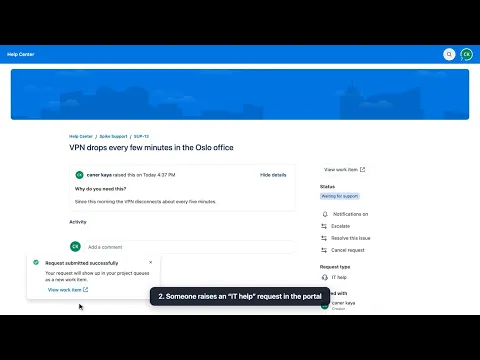
Set up in 2 minutes: one rule per request type
Pick request types and the groups that should follow them. When a matching request is raised, everyone in those groups becomes a participant. The reporter and people already on the request are skipped.
Add a group to a request from the actions menu
Agents open the work item’s actions menu, choose “Add group as participants” and pick one or more groups. No more adding colleagues one by one. JSM’s own rules on who can add participants still apply.
Open requests follow the group
Switch on the hourly check and people who join a group reach matching open requests, up to 25 per rule without asking. A sync on demand shows the numbers first. Removing people who leave is optional.
Supporting media
More details
How do you add a whole group as request participants in Jira Service Management? Jira Service Management lets you add people to a request one at a time, but not a whole Jira group. Teams that need to follow requests, such as network, facilities or finance approvers, end up being added by hand, or not at all.
Built on Atlassian Forge: no data leaves Atlassian. Access needed: read work items, users and groups; edit request participants.
Group Participants fixes that with rules per project (choose request types and the groups to add), an agent action to add any group from the actions menu, an optional hourly sync that brings new group members onto open requests, and results showing who was added, skipped or could not be added.
It stores only settings, group snapshots and, if removal is on, who it added. JSM only accepts participants who can access the service project as customers; people without that access are reported, not silently dropped. Jira emails each person added.
Resources
App documentation
Comprehensive set of documentation from the partner on how this app works
Privacy and Security
Privacy and security questionnaire has been filled by the partner
Privacy policy
Atlassian's privacy policy is not applicable to the use of this app. Please refer to the privacy policy provided by this app's partner.
Partner privacy policySecurity program
This app is not part of the Marketplace Bug Bounty program.
Integration permissions
Group Participants: Add Groups to JSM Requests integrates with your Atlassian app
Version information
Version 3.9.0•for Jira Cloud
- Release date
- Nov 4th 2026
- Summary
- Minor version update
- Details
Minor version update
- Payment model
- Paid via Atlassian
- License type
- Commercial